January 7

1/7- Daily Assignment

1/7- Daily Assignment

1)   (AM Class Only) Hands-On Project (Teams of 2 to 4)

Three Point Lighting-

1) Shot with just Key Light

2) Shot with just Fill Light

3) Shot with just Back Light

4) Shot with Key and Fill Light

5) Shot with Key and Back Light

6) Shot with Fill and Back Light

7) Shot with Key, Fill, and Back Light


2)

Watch all of the below video’s and rank the Top 5. List the name of the school from 1 thru 5….1 the best one etc.

Send the results in the comment section of this post.


Chichester http://youtu.be/4wjcLUF_0Kk
Council Rock North http://youtu.be/mVX1iH2S8Bg
East Stroudsburg South http://youtu.be/EXN55zqgcGs
Emmaus http://youtu.be/Dcjv-j3-nXI
Fleetwood http://youtu.be/FLQjJbq89Y0
Forbes Road CTC http://youtu.be/ywIxm0MTy5w
Fox Chapel http://youtu.be/h1syeuvkELM
Hazleton http://youtu.be/Tckz2RWI5qM
Monessen http://youtu.be/VeEZ_nD-R8Q
Plymouth Whitemarsh http://youtu.be/-JScaS9oeQU
Rockwood http://youtu.be/pmgGdvGBKtw
West Chester Henderson http://youtu.be/uGoCT9xT_Nc
Wilkes-Barre CTC http://youtu.be/BoCVy3VeGKA
Hughesville http://youtu.be/Efh5A51VtYU
Rockwood http://youtu.be/5kKWApv6H8o
Saucon Valley http://youtu.be/xjaAy9dBKFM
Wallenapaupack http://youtu.be/siDk3k98s4w


3) Study with Quizlet

Three games and practice test. Send results to me in the comment section in this post.


January 7

More on Three Point Lighting

Three lights: the Key LightFill Light, and Rim Light (also called Back Light), are adjusted to achieve the classic Hollywood lighting scheme called three-point lighting.
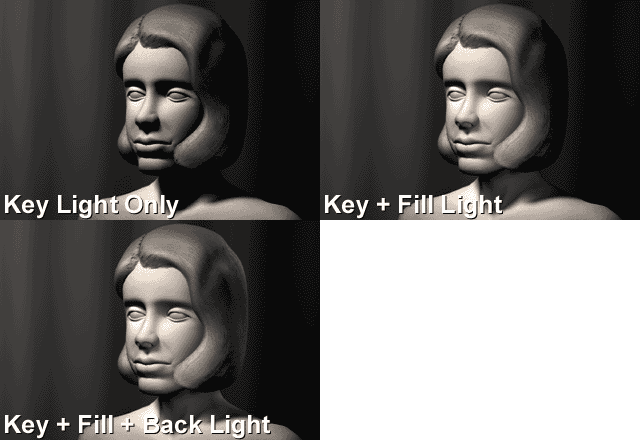
Three Point Lighting
This GIF Animation shows the role of the 3 lights.Here’s how to set them up in your 3D scenes:

1. Start in Darkness. Make sure there are no default lights, and there’s no global ambience. When you add your first light, there should be no other light in the scene.

2. Add your Key Light. The Key Light creates the subject’s main illumination, and defines the most visible lighting and shadows. Your Key Light represents the dominant light source, such as the sun, a window, or ceiling light – although the Key does not have to be positioned exactly at this source.

Create a spot light to serve as the Key. From the top view, offset the Key Light 15 to 45 degrees to the side (to the left or right) of the camera. From a side view, raise the Key Light above the camera, so that it hits your subject from about 15 to 45 degrees higher than the camera angle.
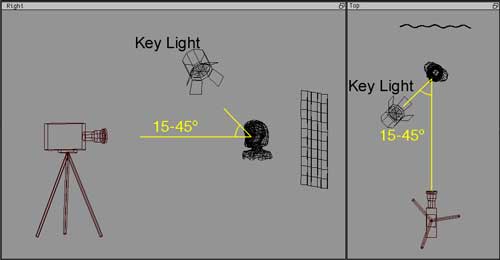
Key Light Postion

The key light is brighter than any other light illuminating the front of the subject, is the main shadow-caster in your scene, and casts the darkest shadows. Specular highlights are triggered by the Key Light.

NOTE: Be sure to stop and do test-renders here. Your “one light” scene (with just the key light) should have a nice balance and contrast between light and dark, and shading that uses all of the grays in between. Your “one light” should look almost like the final rendering, except that the shadows are pitch black and it has very harsh contrast – see the GIF animation at the top of this page, while it only has the Key light visible.

3. Add your Fill Light(s). The Fill Light softens and extends the illumination provided by the key light, and makes more of the subject visible. Fill Light can simulate light from the sky (other than the sun), secondary light sources such as table lamps, or reflected and bounced light in your scene. With several functions for Fill Lights, you may add several of them to a scene. Spot lights are the most useful, but point lights may be used.

From the top view, a Fill Light should come from a generally opposite angle than the Key – if the Key is on the left, the Fill should be on the right – but don’t make all of your lighting 100% symmetrical! The Fill can be raised to the subject’s height, but should be lower than the Key.

Fill Light Postion

At most, Fill Lights can be about half as bright as your Key (a Key-to-Fill ratio of 2:1). For more shadowy environments, use only 1/8th the Key’s brightness (a Key-to-Fill ratio of 8:1). If multiple Fills overlap, their sum still shouldn’t compete with the Key.

Shadows from a Fill Light are optional, and often skipped. To simulate reflected light, tint the Fill color to match colors from the environment. Fill Lights are sometimes set to be Diffuse-only (set not to cast specular highlights.)

4. Add Rim Light. The Rim Light (also called Back Light) creates a bright line around the edge of the object, to help visually separate the object from the background.

From the top view, add a spot light, and position it behind your subject, opposite from the camera.  From the right view, position the Back Light above your subject.
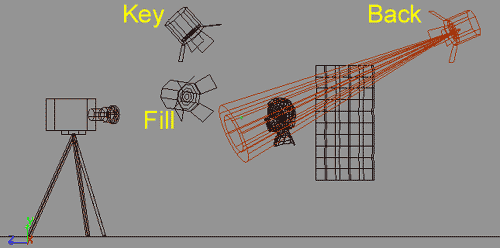
Back Light Position

Adjust the Rim Light until it gives you a clear, bright outline that highlights the top or side edge for your subject.  Rim Lights can be as bright as necessary to achieve the glints you want around the hair or sides of your subject. A Rim Light usually needs to cast shadows. Often you will need to use light linking to link rim lights only with the main subject being lit, so that it creates a rim of light around the top or side of your subject, without affecting the background:
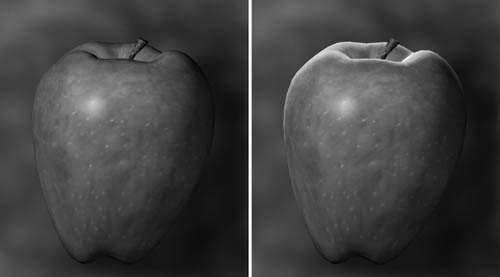
Back Light Renderings

No Back Light (left), Back Light added (right).That’s it.  Three-Point Lighting can be a simple starting-point for lighting just about any subject. By walking through it, this tutorial introduced 3 of the main visual functions served by lights in your 3D scenes: Key Light, Fill Light, and Rim Light.  In a more complex scene, there are other types of lights used as well: Practical Lights, Bounce Lights, Kickers, and Specular Lights, which serve other visual functions.  The book Digital Lighting & Rendering goes into much more depth about these.

The vocabulary of describing lights by their visual function is something you can apply in any scene.  However, even when you use Key, Fill, and Rim lights, don’t think of three-point lighting as an excuse to light by formula, or to make every scene look the same.  You should begin each scene by looking at what is motivated, by which kinds of light would really be in that particular scene.  There is usually some direction from which the light is brightest, and that is where the Key light should come from.  If the object is back-lit, then there may be a rim, in other cases there isn’t one.  It is observing the actual colors, tones, contrast, and direction of real light that actually informs how to create believable scenes in 3D.

While the original first edition of Digital Lighting & Rendering had a chapter focused on Three Point Lighting (which was the inspiration for this tutorial), the new Second Edition de-emphasizes this approach.  Three Point Lighting is still covered in the chapter on Lighting Creatures and Characters, but it is put into a context of understanding the different visual functions of lights that are commonly used in lighting animated characters.  By not presenting it first, hopefully beginning artists won’t mistake three point lighting for any kind of a formula or recipe.  If you are trying to create believable lighting that fits with each unique situation, there’s no shortcut to skip studying the motivations and qualities of real lights that would occur in a particular scene.
January 7

Chapter 12- Techniques of Television Lighting Key Terms (Test on Friday 1/9)

Chapter 12- Techniques of Television Lighting

**KEY TERMS TEST FRIDAY 1/9**

Click to Study with Quizlet

1. back light Illumination from behind the subject and opposite the camera.
2. background light Illumination of the set, set pieces, and backdrops. Also called set light.
3. cameo lighting Foreground figures are lighted with highly directional light, with the background remaining dark,
4. chroma keying An effect that uses color (usually blue or green) for the backup, which is replaced by the background image during a key.
5. contrast ratio The difference between the brightest and the darkest portions in the picture (often measured by reflected light in foot-candles). The contrast ratio for low-end cameras and camcorders is normally 50:1, which means that the brightest spot in the picture should be no more than 50 times brighter than the darkest portion without causing loss of detail in the dark or light areas. High-end digital cameras can exceed this ratio and can tolerate a contrast ratio of 1,000:1 or more.
6. cross-keying The crossing of key light for two people facing each other.
7. diffused light Light that illuminates a relatively large area with an indistinct beam. Diffused light, created by floodlights, produces soft shadows.
8. directional light Light that illuminates a relatively small area with a distinct beam. Directional light, produced by spotlights, creates harsh, clearly defined shadows.
9. falloff (1) The speed with which light intensity decays (2) The speed (degree) with which a light picture portion turns into shadow area. Fast falloff means that the light areas turn abruptly into shadow areas and there is a great brightness difference between light and shadow areas. Slow falloff indicates a very gradual change from light to dark and a minimal brightness difference light and shadow areas.
10. fill light Additional light on the opposite side of the camera from the key light to illuminate shadow areas and thereby reduce falloff. Usually done with floodlights.
11. floor plan A diagram of scenery and properties drawn onto a grid pattern. Can also refer to floor plan pattern.
12. high-key Light background and ample light on the scene. Has nothing to do with the vertical positioning of the key light.
13. key light Principal source of illumination.
14. kicker light Usually directional light that is positioned low and from the side and the back of the subject.
15. light plot A plan, similar to a floor plan, that shows the type, size (wattage) and location of the lighting instruments relative to the scene to be illuminated and the general direction of the beams.
16. location survey Written assessment, usually in the form of a checklist, of the production requirements for a remote.
17. low-key Dark background and illumination of selected areas. Has nothing to do with the vertical positioning of the key light.
18. photographic lighting principle The triangular arrangement of key, back,a and fill lights, with back light opposite the camera and directly behind the object, and the key and fill lights on opposite sides of the camera and to the front and the side of the object. Also called triangle lighting.
19. side light Usually directional light coming from the side of an object. Acts as additional fill light or a second key light and provides contour.
20. silhouette lighting Unlighted objects or people in front of a brightly illuminated background.
January 7

College Spotlight- Penn State

College Spotlight- Penn State

Click for Penn State College of Communications Website

Click to Watch Video on Penn State College of Communications 

Department of Film-Video and Media Studies

Committed to Excellence

The Department is comprised of two majors—film-video production and media studies. Both are committed to excellence in teaching, research and service, and to diversity in thought and action through the participation of its faculty and students in an engaging learning environment.

The Department of Film-Video and Media Studies curriculum is guided by the principle that theory and practice are complementary and mutually reinforcing. Course offerings encourage theoretical and applied approaches to cultural studies, research methods and production in film, video and other digital media.

Classes in the department are generally small and hands-on. Faculty and students alike appreciate and thrive in the collaborative community on campus.

Potential Internships & Employers

Graduates of the film-video major leave the program prepared to work as writers, producers, directors, cinematographers, sound designers and editors, and apply their education to mainstream entertainment, multi-media, public television, education, and corporate and commercial communications.

Development of analytic, creative and writing abilities allows graduates of the media studies major to pursue careers in media, government agencies and public interest groups, as well as private industries needing communications specialists. Graduates may also pursue advanced degrees.